Monitor Mount for 3 Monitors: Dimensions, Arrangement and the Right Choice
In this article
In short
Three monitors side by side need about 1.67 m at 24 inches and about 1.87 m at 27 inches
If you angle the outer ones by 20 to 30 degrees, the setup gets 10 to 15 cm narrower and all three are the same distance from you. The middle monitor is your main screen, the outer ones show what you only check now and then. If your desk is narrower, the pyramid fits at about 1.25 m wide.
Three monitors give you far more overview than two – as long as they fit on your desk and you don't have to keep turning your head. Here you'll find the dimensions by monitor size, the three arrangements that make sense, the rules for a healthy posture and three ready-made configurations. You'll find all matching sets under Monitor Mount for 3 Monitors.

When three monitors are worth it
Three monitors pay off when you need to keep many windows in view at once and one of them is your main work.
- Trading: chart in the middle, order book and watchlist on the left, news on the right.
- Programming: code in the middle, documentation on the left, preview or terminal on the right.
- Office and control rooms: main application in the middle, email, chat, calendar or camera feeds on the outside.
- Sim racing and flight simulation: three monitors as one wide image for a bigger field of view.
If you mostly work with two programs, two monitors are enough. The third one pays off when you would otherwise keep moving windows back and forth.
Side by side, angled or as a pyramid?
For most people, three monitors side by side with the outer ones slightly angled work best. On narrow desks or with large monitors, the pyramid is the better choice: two at the bottom, one above.
| With three 27-inch monitors |  Straight side by side |  Outer ones angled |  Pyramid |
|---|---|---|---|
| Width | approx. 1.87 m | approx. 1.71–1.80 m | approx. 1.25 m |
| Height of the screen area | approx. 36 cm | approx. 36 cm | approx. 73 cm |
| Distance to the monitors | outer ones farther away than the middle | all about the same | both bottom ones the same, one above |
| Looking at the side monitors | to the side, up to approx. 50° | to the side, up to approx. 60° | to the side up to approx. 40°, or up |
| Main screen | centered in front of you | centered in front of you | centered only with "1 at the bottom, 2 on top" |
| Suits | wide desks | most setups | narrow desks, large monitors |
Approximate values for 16:9 monitors with about 1 cm bezel per side and a 1 cm gap, outer ones angled 20 to 30 degrees, pyramid with two monitors at the bottom. Viewing angle to the outer edge at a 75 cm viewing distance to the middle monitor.
Straight side by side is the widest option. It works if your desk is wide enough and you only look at the outer monitors now and then.
Outer ones angled means you turn the outer monitors 20 to 30 degrees toward you. Then all three are about the same distance away and you look straight at each image – exactly what the German Technical Rule for Workplaces ASR A6 recommends for multiple screens. As a bonus, the setup gets 10 to 15 cm narrower. You don't turn your head any less, though – to the outer edge even a little more, because it moves closer to you. In return, you see the outer images straight on instead of at a distorted angle.
What is ASR A6?The German Technical Rule for Workplaces ASR A6 "Screen work" sets out how screen workstations in Germany should be set up – from viewing distance to the arrangement of multiple monitors. It is drawn up by the Committee for Workplaces and published by the Federal Ministry of Labour, currently in the July 2024 edition. For office workstations it is the benchmark, for home offices a good guide. Read ASR A6 (German)
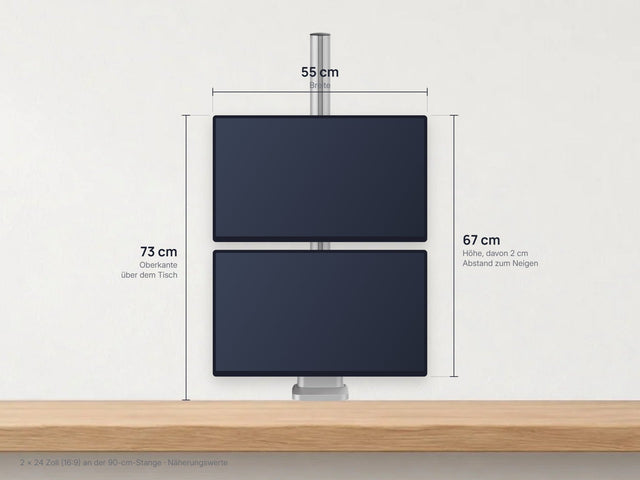
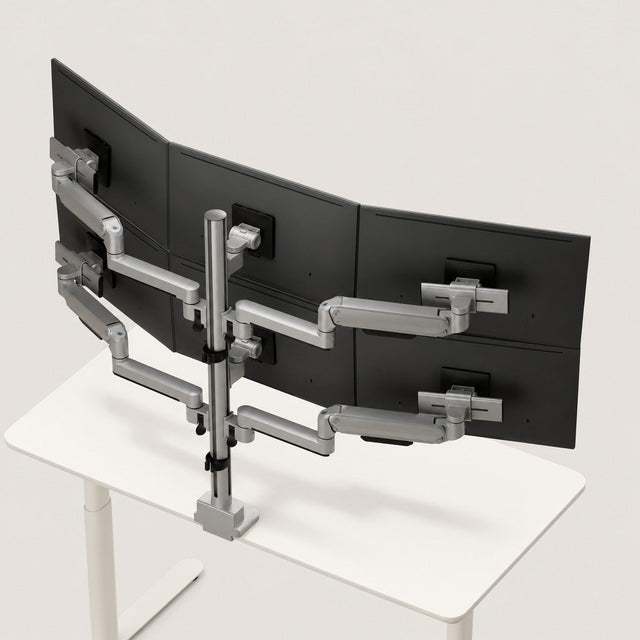
As a pyramid, two monitors hang at the bottom and one centered above – or the other way round, one at the bottom and two on top. That saves around a third of the width. As with two stacked monitors, only what you check now and then belongs on top.
How wide are three monitors by screen size?
The values above are for 27 inches. Here you can see the width for common sizes from 24 to 34 inches. If the setup ends up wider than your desk, that's no problem as long as a mount carries the monitors: they may stick out over the edge of the desk.
| Monitor | Straight side by side | Outer ones angled 20–30° | Pyramid (2 at the bottom) |
|---|---|---|---|
| 24 inches (16:9) | approx. 167 cm | approx. 153–161 cm | approx. 111 cm |
| 27 inches (16:9) | approx. 187 cm | approx. 171–180 cm | approx. 125 cm |
| 32 inches (16:9) | approx. 221 cm | approx. 201–212 cm | approx. 147 cm |
| 34-inch ultrawide (21:9) | approx. 246 cm | approx. 224–236 cm | approx. 164 cm |
How we calculated it: screen width from diagonal and aspect ratio, plus about 1 cm of bezel per side and a 1 cm gap between the monitors. The dimensions in your monitors' data sheets are what count.
Tip: plan for depthWhen angled, the outer 27-inch monitors sit about 20 to 30 cm further forward than the middle one. To keep enough viewing distance, a desk 80 cm deep works best.
Ergonomics: work in the middle, check on the outside
With three 27-inch monitors, you turn your head about 50 degrees to reach the outer edge. That's fine for the occasional glance, but too much for hours of work.
ASR A6 is clear on this: a screen you mainly use belongs centrally in front of you. If you use several equally often, they should sit close together side by side at roughly the same viewing distance of at least 50 cm (sections 6.3.1 and 6.3.3). Here's how to set up three monitors:
- Main screen in the middleThe monitor you work on most sits straight in front of you. Line up your keyboard and chair with it.
- All three at the same heightThe top edges sit on one line, at most at eye level. That way your gaze doesn't jump up or down when you switch.
- Angle the outer ones 20 to 30 degreesTurn the outer monitors toward you until you look straight at the center of their image. Then all three are about the same distance away.
- Check the viewing distanceAt least 50 cm to each monitor, more like 70 to 80 cm at 27 inches. If you have to lean forward to read something on the outside, increase the font size.
- Close the gapsPush the monitors as close together as the arms allow. The narrower the gap, the calmer the screen area looks.
Tip for the outer monitors: go for IPS or VA panels. They stay easy to read even from an angle, while TN panels fade.
What goes on which monitor?
Two examples of what that can look like:
Example: trading
- Order book & watchlist
- Main chart & order entry
- News & calendar
Main screen
You make decisions in the middle, the context runs on the left and right. A quick glance to the side is enough.
Example: development
- Documentation & tickets
- Code editor
- Preview & terminal
Main screen
You write in the middle, look things up on the left and see the result right away on the right – without moving a single window.
What matters in the monitor mount
1. Arm reach and gaps
Check how far the outer arms reach. If they are too short, large monitors bump into each other. If they are too long, a wide gap remains. At 27 inches you need about 63 cm from monitor center to monitor center, at 24 inches about 56 cm. With heads that slide sideways, you push the monitors flush together.

2. Weight, VESA size and desktop
Three monitors plus the mount quickly weigh 20 to 35 kg, and everything hangs from one point. For each monitor, check the weight without stand and the VESA hole pattern on the back, usually 75 × 75 or 100 × 100 mm. With soft desktops, honeycomb-core panels or glass, a reinforcement plate belongs under the clamp.
Do your monitors fit? Enter the brand and model. The Setup Finder shows you the VESA size, compatible mounts and the accessories you need.
3. Fixed or movable
You set up the middle monitor once and leave it. You move the outer ones more often: to angle them, turn them to portrait or push them aside when you need space. That's why spring arms pay off mainly on the outside. Articulated arms are the more affordable choice: you set them once, and the height stays as it is.
Three ready-made configurations with 3IDEE ONE
To be upfront: 3IDEE ONE is our own system. That's why you'll only find specifications here that you can check in the data sheet – and further down, when it's not the right choice.
In all three, one monitor sits fixed in front of the pole – the middle one side by side, the top one in the pyramid. The others hang on arms. The configurations differ in how large your monitors may be and how much width you have.

1. Three up to 24 inches side by side
The entry into a three-monitor setup.
- Middle fixed, spring arms on the outside: up to 20.5 cm higher with one hand
- Angle, swivel or turn the outer ones to portrait
- About 3 cm gap remains between the monitors
€279incl. VAT
View set
2. Three up to 27 inches, flush
The best choice for most people: larger monitors and one continuous screen area.
- Outer ones slide sideways until the edges meet
- Middle fixed, spring arms on the outside
- Up to 11 kg per monitor
€309incl. VAT
View set
3. Pyramid up to 40 inches
For narrow desks and large monitors.
- Two at the bottom, one above – or the other way round
- At 27 inches only about 1.25 m wide
- Up to 40 inches and 12 kg per monitor
from €259incl. VAT
Open configuration€259 with articulated arms (set once, height stays), €359 with spring arms (height adjustable with one hand).
Prices according to the shop and configurator, as of Nov 17, 2026, including VAT.
All sets to compare, with filters by size and layout: Monitor Mounts for 3 Monitors.
The specs
| Feature | Side by side up to 24 inches | Side by side up to 27 inches | Pyramid up to 40 inches |
|---|---|---|---|
| Monitor size | 17–24 inches | 17–27 inches | up to 40 inches |
| Weight per monitor | 2–12 kg, curved 2–11 kg | 2–11 kg, curved 2–10 kg | up to 12 kg |
| Arms | middle fixed, spring arms on the outside | middle fixed, spring arms on the outside, sliding sideways | top fixed, articulated arms at the bottom (spring arms at extra cost) |
| Height adjustment | outer ones up to 20.5 cm higher and 3.5 cm lower than the middle monitor | outer ones up to 20.5 cm higher and 3.5 cm lower than the middle monitor | on the pole, monitor center 27–100 cm above the desk |
| Tilt / swivel / rotate | +75° / −45° · ±90° · ±180° | +75° / −45° · ±90° · ±180° | +75° / −45° · ±90° · ±180° |
| VESA | 75 × 75 and 100 × 100 mm | 75 × 75 and 100 × 100 mm | 75 × 75 and 100 × 100 mm |
| Desktop | 10–50 mm, clamp or through-desk mount | 10–50 mm, clamp or through-desk mount | 10–50 mm, clamp or through-desk mount |
| Warranty and trial period | 25-year system warranty, 60-day trial | 25-year system warranty, 60-day trial | 25-year system warranty, 60-day trial |
Source: data sheets of the monitor mount for 3 monitors up to 24 inches and up to 27 inches and the pyramid configuration, as of Nov 17, 2026. Terms: warranty and 60-day trial.
When 3IDEE ONE isn't the right fit
- Heavy monitors: above 12 kg per monitor without stand (above 11 kg with the 27-inch set), it's the wrong choice.
- No VESA 75 or 100: if your monitor has a different hole pattern or none at all, you need a matching VESA adapter or a different mount.
- Thick desktops: above 50 mm, neither the clamp nor the through-desk mount fits.
- Monitors on the wall: without a desk, a wall mount is the better solution.
- Tight budget, never adjusting: simple stands for three monitors are cheaper. If you never move the monitors after setup, a stand like that is often enough.
Grows with your setup
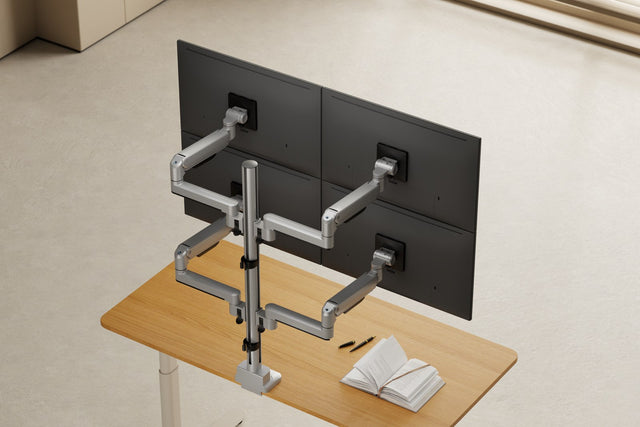
3IDEE ONE is modular. With more parts, three monitors become four in a 2×2 grid, or you split the mount across two workstations. How the system works
Cables and connection
Your computer needs three free video outputs. For desktop PCs the graphics card is usually enough, for laptops a docking station that drives three external monitors. The data sheet says how many monitors your laptop can handle – MacBooks with a base chip sometimes only manage one or two; Apple lists the exact number per model, for example for the MacBook Air.
Measure the cable route from the computer to the pole and on to the outer monitors: it's often 60 to 80 cm longer than to the middle one. Run the cables along the arms and leave some slack so no plug gets pulled when you angle them.
Ready for three monitors?
Check off what you've already sorted out. If something is missing, you'll find the answer above.
All sorted? Then pick the right monitor mount for 3 monitors.